FREE SPEAKING CHALLENGES FOR SECONDARY MFL
Your topic.
Their next words
out loud.
Turn what you teach into a short AQA/Edexcel high frequency aligned speaking challenge. Pupils listen, say the phrases aloud and get an instant pronunciation score.
- Free to use
- No accounts
- No app to install
- French
- Spanish
- German
Years 7–11
Build a speaking quiz for your class
Type what you taught. We write the phrases. You check them before anyone sees them.
Check the wording. Hear the audio. Remove a phrase.
Takes a minute. Uses your microphone. Nothing is saved.
OR START IN ONE CLICK
Ready-made quizzes. Just add your email.
How it works
A simple routine, from your lesson topic to their first attempt.
Check the phrases
Read the translations, hear the audio and remove anything that does not fit.
Share with your class
Display a join code or share a link. Pupils join with automatically assigned aliases.
See how they get on
View the class scores. Use pronunciation results as a starting point for follow-up.
- Randomly generated usernames. Only you can link one to a pupil.
- Nothing is stored. Recordings are scored in the UK, then deleted immediately.
- Results to you only. Usernames and scores, to your school email.
- Not biometric data. Voice is used for pronunciation scoring, not identification.
SEE IT FROM THEIR SIDE
Try it before
your class does.
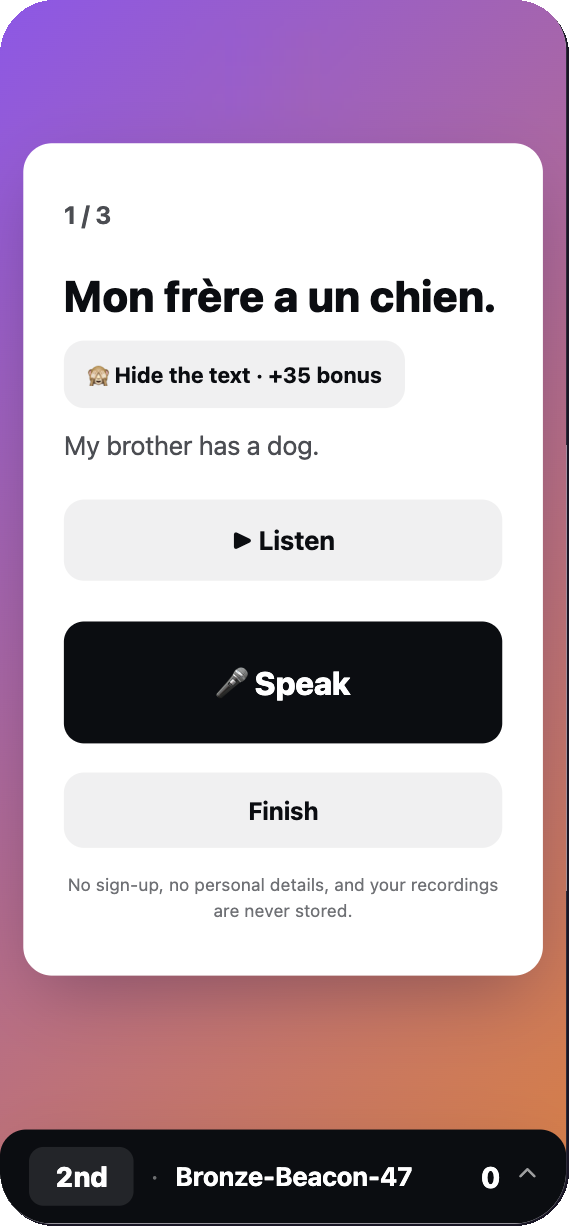
Hear a phrase. Record an attempt. See the pronunciation score for yourself.
Illustrative pupil screen
When to use it
REVISIT
Bring last lesson back
Practise familiar words and phrases aloud before moving on.
REINFORCE
Put today's topic into words
Give pupils another chance to say the language you have just taught.
REHEARSE
Prepare for speaking tasks
Build familiarity with useful phrases ahead of a longer speaking activity.
Before you bring it to class
Can I check the content first?
Yes. Preview the phrases and translations, listen to the audio and remove phrases before creating the challenge.
Do pupils need phones?
They can use a laptop or tablet with a browser and microphone — each pupil needs a microphone-enabled device. Pupils join by link, code or QR; scanning a QR is optional.
What does the score tell me?
It is an AI pronunciation score for the phrase attempted. Use it for practice and follow-up, rather than as a GCSE grade.
Do pupils need an account?
No. Pupils join with an automatically assigned alias. Read how recordings and results are handled before using it with a class.
Start with a topic you know your class knows.
Preview the phrases. Then decide when to use them.